

Transform Your Designs with Advanced 3D Rendering
- Chaim Gestetner

- Sep 25, 2025
- 4 min read
When it comes to bringing architectural visions to life, nothing compares to the power of advanced 3D rendering techniques. These tools transform flat blueprints and sketches into vivid, immersive experiences that captivate clients and stakeholders alike. Imagine walking through a future home or office before a single brick is laid. That’s the magic of 3D rendering. It’s not just about pretty pictures; it’s about making smarter decisions, reducing costly errors, and accelerating project approvals.
In this post, I’ll take you through the essentials of advanced 3D rendering, share practical tips to elevate your designs, and explain how you can leverage these techniques to stand out in a competitive market. Whether you’re a developer, architect, or interior designer, this guide will help you unlock the full potential of your projects.
Why Advanced 3D Rendering Techniques Matter
Advanced 3D rendering techniques have revolutionized the way we visualize and communicate architectural ideas. Unlike traditional 2D drawings, 3D renderings provide a realistic, three-dimensional perspective that helps everyone involved understand the project better. This clarity is crucial when you’re trying to sell a concept or secure funding.
Some of the key benefits include:
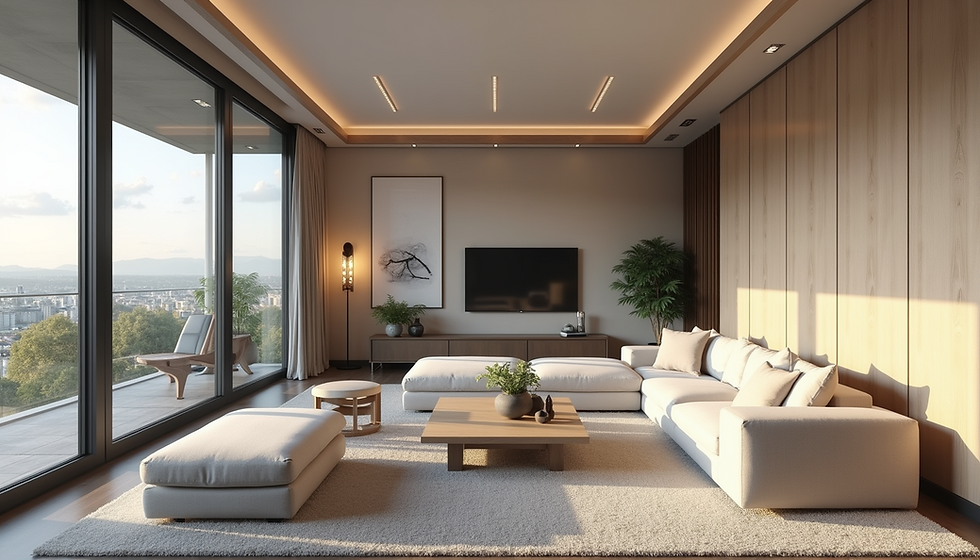
Enhanced Realism: Photorealistic textures, lighting, and shadows create images that look like actual photographs.
Improved Communication: Clients and contractors can see exactly what the final product will look like, reducing misunderstandings.
Faster Revisions: Changes can be made quickly in the digital model, saving time and money.
Marketing Edge: Stunning visuals attract buyers and investors, making your project stand out.
For example, using ray tracing technology, you can simulate how natural light will fill a room at different times of the day. This insight helps optimize window placement and interior design choices. Or, by incorporating virtual reality, you can offer immersive walkthroughs that let clients explore spaces interactively.

Exploring Advanced 3D Rendering Techniques
Diving deeper into advanced 3D rendering techniques, it’s important to understand the tools and methods that make these visuals so compelling. Here are some of the most impactful techniques you should consider:
1. Photorealistic Rendering
This technique focuses on creating images that are indistinguishable from real photos. It involves detailed textures, accurate lighting, and reflections. Software like V-Ray, Corona Renderer, and Lumion are popular choices for achieving this level of realism.
2. Real-Time Rendering
Real-time rendering allows you to interact with the 3D model instantly. This is especially useful during client presentations or design reviews. Tools like Unreal Engine and Twinmotion enable this dynamic experience, making it easier to explore different design options on the fly.
3. Parametric Design Integration
By integrating parametric design tools such as Grasshopper with rendering software, you can create complex, adaptive models that respond to specific parameters like sunlight, wind, or structural loads. This approach enhances both aesthetics and functionality.
4. Virtual Reality (VR) and Augmented Reality (AR)
VR and AR take 3D rendering to the next level by immersing users in the design. VR headsets allow full walkthroughs, while AR overlays digital models onto real-world environments using smartphones or tablets. These technologies improve spatial understanding and client engagement.
5. Post-Processing Enhancements
After rendering, post-processing in software like Adobe Photoshop or After Effects can add final touches such as color grading, depth of field, and atmospheric effects. These subtle adjustments elevate the overall impact of your visuals.
By mastering these techniques, you can create presentations that not only impress but also provide actionable insights for your projects.

What is the Cost of 3D Visualizer?
Understanding the cost of hiring a 3D visualizer or investing in 3D rendering services is essential for budgeting your projects effectively. The price can vary widely depending on several factors:
Project Complexity: More detailed models with intricate textures and lighting require more time and resources.
Rendering Quality: Photorealistic images and animations cost more than basic 3D models.
Turnaround Time: Faster delivery often comes with a premium.
Experience and Reputation: Established studios or freelancers with a strong portfolio may charge higher rates.
On average, a single high-quality 3D rendering can range from $300 to $1,500. Full animation walkthroughs or VR experiences can cost several thousand dollars. However, these investments often pay off by speeding up approvals and attracting buyers.
If you’re looking for reliable and cost-effective solutions, partnering with experts in 3d architectural visualization services can provide you with tailored options that fit your budget and project needs.
Practical Tips to Maximize Your 3D Renderings
Creating stunning 3D renderings is both an art and a science. Here are some actionable recommendations to help you get the most out of your visualizations:
Plan Your Shots Like a Photographer
Think about composition, angles, and focal points. Eye-level views often work best for interior spaces, while wide-angle shots showcase entire buildings or landscapes. Avoid clutter and focus on key design elements.
Use Natural Lighting
Simulate sunlight and shadows to add depth and realism. Consider the time of day and season to reflect how light interacts with your design. This also helps highlight materials and textures.
Incorporate Human Scale
Adding subtle human figures or furniture helps viewers understand the scale and usability of spaces. Keep these elements minimal to avoid distraction.
Optimize for Different Platforms
Render images in various resolutions and formats depending on where they will be used - websites, presentations, or print materials. For VR or AR, ensure compatibility with the target devices.
Collaborate Closely with Your 3D Visualizer
Clear communication about your vision, goals, and feedback is crucial. Share reference images, sketches, and mood boards to guide the process. Regular check-ins help avoid costly revisions.
By applying these tips, you’ll create visuals that not only look great but also serve as powerful tools for decision-making and marketing.
Elevate Your Projects with Cutting-Edge Visualization
Advanced 3D rendering techniques are more than just a trend - they are a fundamental shift in how architectural projects are designed, presented, and sold. By embracing these technologies, you gain a competitive edge that can transform your workflow and client relationships.
Whether you’re showcasing a luxury condominium, planning a commercial complex, or designing an innovative interior, the ability to visualize your ideas in stunning detail makes all the difference. It reduces guesswork, builds confidence, and accelerates project timelines.
If you want to take your designs to the next level, consider partnering with specialists who offer comprehensive 3d architectural visualization services. Their expertise and technology can help you create immersive experiences that truly bring your vision to life.
The future of architectural design is here, and it’s rendered in three dimensions. Are you ready to transform your projects?


Comments